Keeping players coming back is one of the biggest challenges any venue faces. Now there is a simple, built-in way to do exactly that. Every MultiBall system includes a new free Player Queue, a tool that lets players sign themselves up, compete for a spot on the leaderboard, and keep returning to defend it, all with no staff needed.
Here is what it does and how you can put it to work at your venue.
A Self-Running Leaderboard Challenge
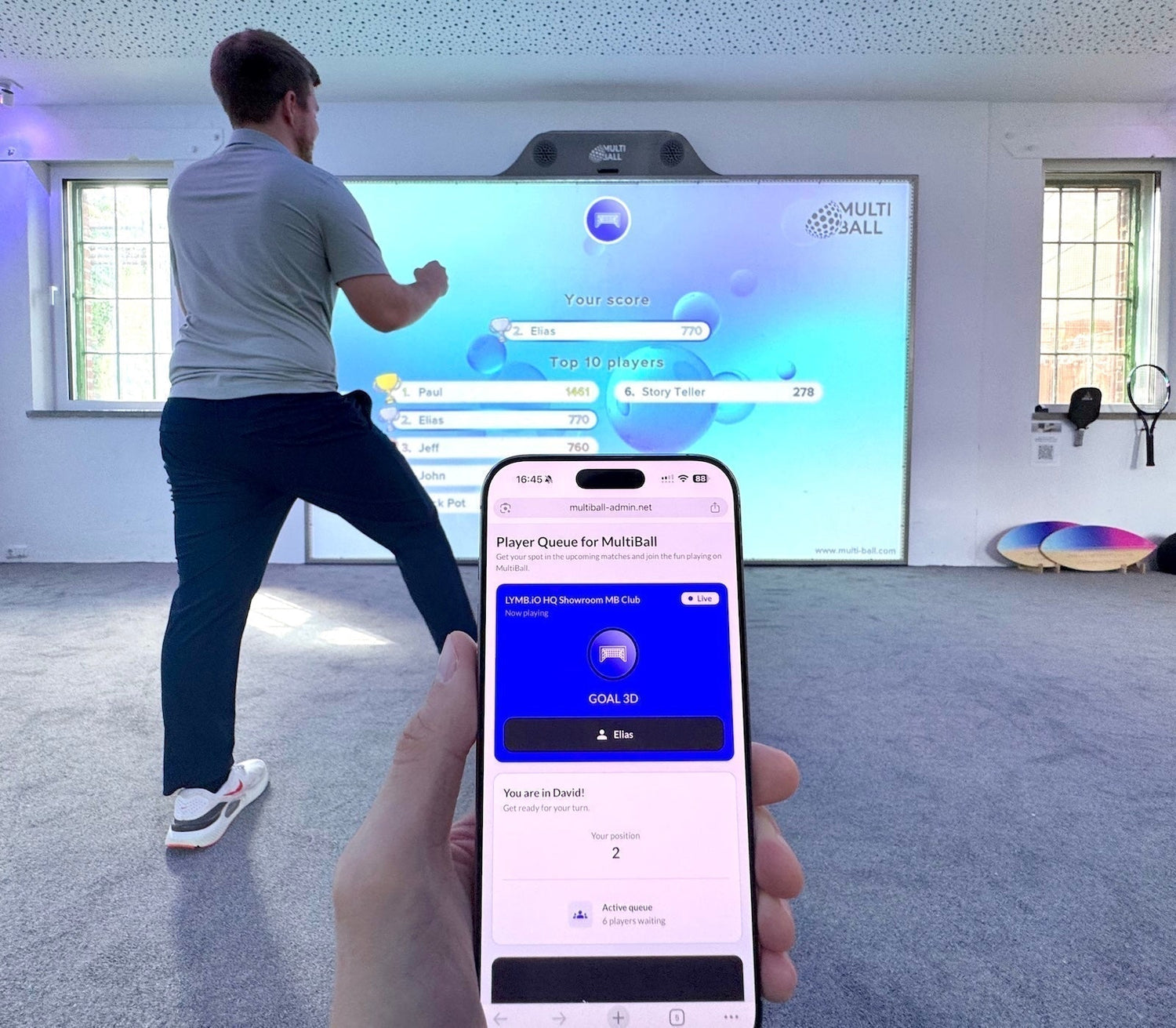
The free Player Queue turns your wall into an ongoing competition that runs on its own. Players sign themselves up with their name straight from their phone, join the queue, and compete for a place on the leaderboard. Once a round ends, the system automatically switches to the next player in the queue.
Setting it up is simple. Place the provided QR code next to your MultiBall or at the entrance to your play area, and players scan to join from their own device.

With the option to show the live leaderboard additionally on a second screen, the competitive nature of players takes over as they watch their names climb and others try to overtake them.
Built to Bring Players Back
The real value of the Player Queue is repeat engagement. When players can put their name on a leaderboard and chase a place in the top 10, they have a reason to return again and again. Especially during a weekly challenge where the goal is to hold the top spot until the challenge ends.
You can run it for one specific game to crown a weekly champion, or keep it active across every game on your system. Either way, it transforms a one-time visit into a habit, and turns your wall into a destination players come back to rather than try just once.
How the Player Queue Supports Operators
Three things make the free Player Queue a genuine win for venues:
You can decide to control the Player Queue or run it staff-free. With Public sign-in and Auto Advance activated, players sign themselves in, the queue advances on its own, and the leaderboard updates in real time, so there is nothing for your team to manage.

It costs nothing extra. The free Player Queue is included in your system subscription. You will find it in the new Queue tab next to your system settings, and you can enable or disable it at any time. Additional settings like 1-vs-1 Multiplayer or Play Again give you engaging options for different scenarios.
It drives competition. By giving players a name, a score, and a reason to compete, it turns casual play into ongoing engagement that keeps your venue busy.
Please note the Auto Advance function is currently supported for games released since 2024.
More Power for Events: Player Queue Pro
For events and activations, Player Queue Pro takes things further and turns your MultiBall into a lead generation tool.

The custom sign-up form is now easier to use and far more flexible. Besides the email address, you get more field options and richer branding to match your look. You can now connect one form to multiple systems or switch between forms for different scenarios. Players can sign themselves up for fully automatic operation, or your event staff can control the sign-up and queue directly.

Every entry joins the queue and saves the player's details as a lead you or you event client can follow up with later, making it a powerful tool for events, giveaways, and brand activations. BMW showed just how powerful this can be, generating more than 2,300 leads during a single tennis event.
Get Started Today
The free Player Queue is available now on every MultiBall system. Sign in to your Admin, open the new Queue tab, and set up your first challenge.
Your venue is missing interactive entertainment? Learn more about the interactive sports wall MultiBall.